How Much DPI Is Good For Gaming Mouse? A Practical Guide
Choosing the right mouse sensitivity makes a noticeable difference in how comfortable gaming actually feels. But how much DPI is good for gaming mouse depends on your game genre, your playing style, and how much physical desk movement you prefer. Instead of automatically cranking the DPI to the highest number available, it pays to understand what DPI actually does so you can find a balance that gives you real control.
What Is DPI On A Gaming Mouse?
DPI stands for dots per inch. For a mouse, it describes how many counts the sensor registers for each inch of physical movement.
A high DPI makes the cursor move farther with the same physical mouse movement, while a low setting requires more movement to cover that distance.
Most gaming mice let you adjust this, giving you the freedom to test different sensitivity settings until you find one that feels natural. Just keep in mind that DPI is only part of the equation—in-game sensitivity also affects how your mouse movement feels.
So, How Much DPI Is Good For Gaming Mouse?
There isn’t a single magic number that every gamer uses. The right setting depends largely on personal preference and the type of game you’re playing.
Some players prefer low DPI because it allows them to make wider physical movements, while others prefer high DPI for quicker movement with smaller hand motions.
When deciding where to start, consider:
- Your game:
A setting that feels comfortable in a precision-focused shooter may not feel the same in a fast-paced strategy game. - Your mousepad:
A larger desk mat gives you more room for wider movements, while a smaller pad may make a tighter movement range more practical. - Your playing style:
Think about whether you aim with your arm or turn with your wrist. - Your in-game sensitivity:
This setting also affects how your mouse movement feels in the game. - Your comfort:
A setting that feels comfortable and consistent is easier to use than one chosen simply because the number looks impressive.
Instead of stressing over a specific stat, test a few settings to determine how much DPI is good for gaming based on what feels comfortable and gives you consistent control.
Does Higher DPI Mean Better Gaming Performance?
A massive DPI spec doesn’t automatically make a mouse better.
It’s just one hardware spec among many. Practical features like sensor tracking, shell shape, overall weight, button layout, and hand ergonomics can also affect how well a mouse works for you.
For instance, if a mouse has a very high maximum DPI but its shape feels uncomfortable in your hand, that extra DPI may not matter much to you. Look at the real-world features you’ll rely on every day rather than focusing only on maximum DPI numbers.
How DPI Works With In-Game Sensitivity
Your physical mouse DPI and your in-game sensitivity work together.
Because of this pairing, two players can use different DPI settings but achieve a similar on-screen movement speed by adjusting their in-game sensitivity. That’s why finding how much DPI is good for gaming mouse setups depends on more than the hardware profile alone.
If you’re fine-tuning your rig, tweak your settings in small increments. Making massive jumps all at once makes it hard to tell what actually improved your aim. You can also save distinct profiles for different game genres if your needs shift.
Should You Use Different DPI Settings For Different Games?
You can, although you don’t have to.
For example, you may prefer one DPI setting for a game that requires precise aiming and another for a game where you frequently move the cursor across the screen. If your mouse supports profile switching, saving different DPI levels can make changing between games more convenient.
Can You Customize Gaming Mouse Settings?
Some gaming mice support official driver software that lets you adjust DPI and customize settings such as macros and lighting, giving you more control over how the mouse works and looks.
What Should You Look For In A Gaming Mouse?
DPI is worth checking, but it shouldn’t dictate your entire purchase.
Before picking up a new mouse, prioritize:
- Sensor:
Consistent tracking that suits the games you play. - Shape and grip:
A shell design that matches your palm, claw, or fingertip grip comfortably. - Weight:
Whether you prefer ultra-lightweight shells for fast sweeps or weighted bodies for stability. - Buttons:
Enough programmable buttons to map the actions you use most. - Connectivity:
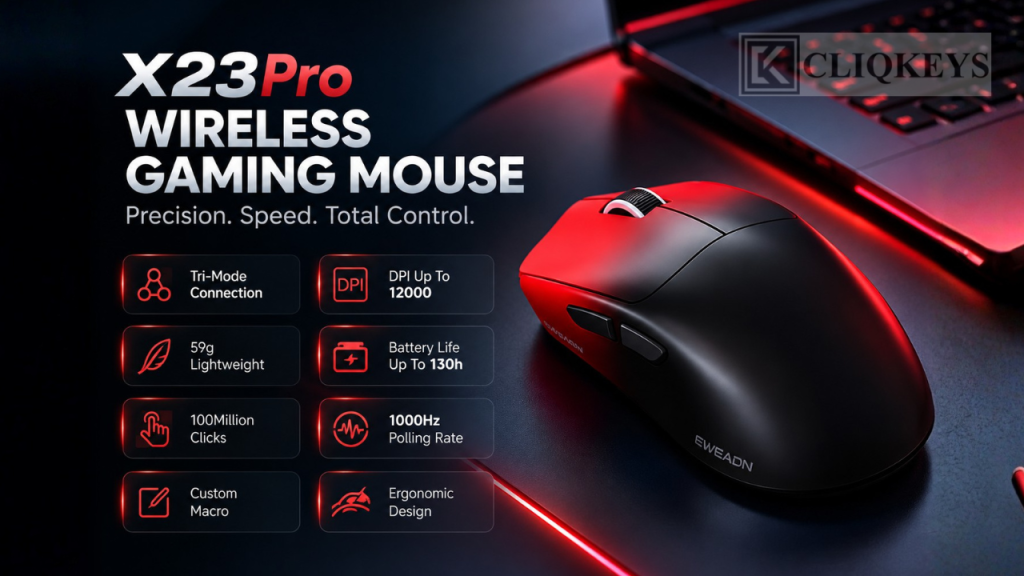
Consider a mouse with tri-mode connectivity if you want flexibility between wired, 2.4GHz wireless, and Bluetooth connections.
Focusing on these practical factors can be more useful than choosing a mouse based only on its maximum DPI number.
Find The Setting That Works For You
Ultimately, how much DPI is good for gaming mouse performance depends on what feels comfortable and predictable during actual gameplay. The right setting is the one that lets you control your movements without unnecessary strain.
DPI is only one part of choosing a gaming mouse. Think about the shape, weight, buttons, and connection too, especially if you’ll be using it for long gaming sessions. Browse the gaming mice at CliqKeys to compare your options and see what fits your setup.
You don’t need the highest DPI setting available. Take some time to try different settings and stick with the one that feels comfortable and predictable during the games you play.